Safety lapses often stem not from ignorance, but from inconsistency. On fast-moving job sites, taking time for structured safety conversations can feel like a burden—until an incident occurs. A well-designed blank toolbox talk template eliminates that friction. It turns safety discussions from a box-ticking exercise into a repeatable, meaningful process that keeps crews informed, aligned, and protected.
This article delivers a practical, ready-to-use blank toolbox talk template, explains how to implement it effectively, and highlights common pitfalls that reduce its impact. Whether you're managing a construction crew, maintenance team, or industrial operation, the right template becomes the backbone of your safety culture.
Why a Blank Toolbox Talk Template Is Essential
Toolbox talks—also known as tailgate meetings—are short, focused safety discussions held before work begins. They address specific hazards, reinforce procedures, and promote team accountability. But without structure, these conversations can drift, become inconsistent, or fail to document critical information.
A blank toolbox talk template standardizes the process. It ensures every meeting covers essential elements: topic, date, attendees, hazards, controls, and signatures. More importantly, it creates a paper trail for compliance and training verification—critical for OSHA audits or insurance reviews.
Without a template, teams often skip documentation, repeat topics unnecessarily, or fail to engage workers in meaningful dialogue. A blank template isn’t just paperwork—it’s risk mitigation.
Key Components of an Effective Blank Template
A high-impact toolbox talk template isn’t just a form—it’s a framework for safety engagement. The best versions include these core sections:
#### 1. Meeting Header - Company name and logo - Job site or location - Date and time - Facilitator (safety officer, supervisor, etc.)
This establishes context and ownership. For multi-site operations, clearly identifying the location prevents confusion during audits.
#### 2. Topic Selection A dropdown or blank line for the safety topic ensures relevance. Common categories include: - Fall protection - Hand and power tool safety - Electrical hazards - PPE requirements - Confined space entry
Rotating topics based on seasonal risks or upcoming tasks increases engagement and reduces redundancy.
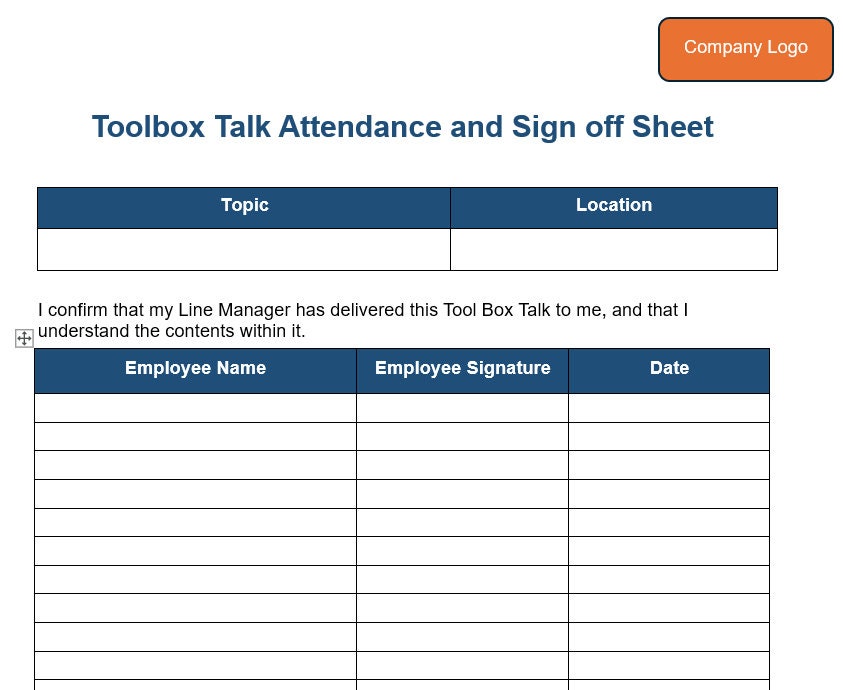
#### 3. Attendee Sign-In Section Includes: - Employee name - Signature - Job title or role
Signatures confirm participation and understanding. Digital versions may use e-signatures, but printed sheets remain common in field environments.
#### 4. Hazard Identification A short section where the facilitator lists potential hazards related to the topic. Example: > Topic: ladder safety > Hazards: uneven ground, overhead power lines, unstable setup, overreaching
This trains workers to think proactively about risks.
#### 5. Control Measures Actionable steps to mitigate each hazard. For the ladder example: - Inspect ladder before use - Set on level surface with stabilizers - Maintain three-point contact - Keep top three rungs clear
Linking hazards to specific controls reinforces safe behavior.
#### 6. Discussion Notes An open field for recording key points raised during the talk. This captures worker input—often the most valuable part of the meeting.
#### 7. Follow-Up Actions Assign tasks like: - Replace damaged PPE by Friday - Audit ladder storage area next week
Accountability increases compliance.
Sample Blank Toolbox Talk Template (Text Version)
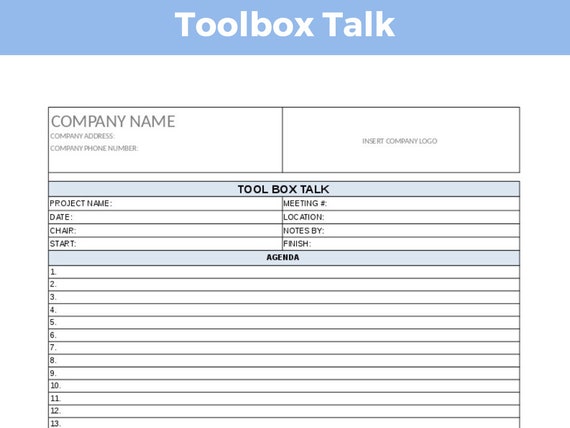
TOOLBOX TALK RECORD Company: _________________________________ Site: ____________________________________ Date: ___________ Time: _______ Facilitator: _____________________________
TOPIC: ____________________________________
- HAZARDS IDENTIFIED:
- ________________________________________
- ________________________________________
- ________________________________________
- CONTROL MEASURES:
- ________________________________________
- ________________________________________
- ________________________________________
DISCUSSION NOTES:
FOLLOW-UP ACTIONS: Task: ___________________ Owner: _________ Due: ____
ATTENDEES: Name Signature Role __________________ __________ __________ __________________ __________ __________ __________________ __________ __________ __________________ __________ __________
This template is printable, editable, and works across industries. Save it as a Word or PDF file, then customize headers for your organization.
Common Mistakes That Undermine Toolbox Talks
Even with a solid template, poor execution weakens impact. Avoid these recurring errors:
#### ❌ Repeating the Same Topics Monthly Rotating topics based on current work, season, or incident trends keeps content fresh. Use a 12-month safety calendar to plan ahead.
#### ❌ Reading from the Template Without Engagement A facilitator who drones through points kills participation. Instead, ask questions: “Who’s seen this hazard before?” or “How would you handle this?”
#### ❌ Skipping Sign-Ins or Backdating Missing signatures invalidate documentation. Never sign for absent workers—this raises red flags during inspections.
#### ❌ Holding Talks Off-Site or Too Early Conduct talks at the actual work location, just before the shift. Holding them in the office an hour early disconnects discussion from real conditions.
#### ❌ No Follow-Through on Action Items If you promise to fix a hazard but never update the team, trust erodes. Revisit action items in the next meeting.
How to Use the Template in Daily Operations
Integrating the blank template into workflows ensures consistency. Here’s a realistic daily use case:
Scenario: A roofing crew prepares for a day of shingle replacement.
- Pre-Meeting (5 min): The foreman selects "Fall Protection" as the topic, referencing recent wind forecasts and roof edge work.
- Meeting (10–15 min): At the job site, the team gathers. Using the template, the foreman outlines hazards (wind, slippery surfaces, edge work) and controls (harness use, anchor points, buddy checks).
- Discussion: Workers share near-misses from past jobs. One mentions a harness clip failure—prompting an equipment check.
- Documentation: Attendees sign the sheet. One worker is assigned to inspect all lanyards by noon.
- Follow-Up: The next day’s talk includes a status update on harness checks.
This cycle builds awareness, encourages ownership, and strengthens safety culture.
Best Practices for Maximum Impact
A template is only as strong as the habits around it. Follow these field-tested strategies:

- Keep Talks Short: 10–15 minutes max. Focus on one topic.
- Use Visuals: Bring a damaged glove or faulty tool to illustrate hazards.
- Rotate Facilitators: Let experienced workers lead occasional talks—boosts engagement.
- Archive Records: Store completed templates by week or month. Digital folders beat dusty binders.
- Review Quarterly: Scan past talks to spot recurring issues or compliance gaps.
Teams that treat toolbox talks as interactive sessions—not lectures—see fewer incidents and higher near-miss reporting.
Top 5 Free & Customizable Template Sources
While you can build your own, these reliable sources offer polished blank toolbox talk templates:
- OSHA.gov
- - Official, compliant format
- - Minimal design, easy to adapt
- - Free PDF and DOC versions
- SafetyCulture (iAuditor)
- - Offers editable digital templates
- - Mobile-friendly with photo upload
- - Cloud storage and reporting
- Creative Safety Supply
- - Industry-specific templates (construction, manufacturing)
- - Includes bilingual (English/Spanish) versions
- - No registration required
- Template.net
- - Professionally designed layouts
- - Editable Word and PDF formats
- - Some free, some paid
- SafetyBoss
- - Construction-focused templates
- - Includes hazard icons and OSHA references
- - Weekly subscription with rotating topics
Choose based on your team’s tech access and documentation needs. For low-tech sites, a simple printable Word doc often works best.
Making the Template Work for Your Team
A blank toolbox talk template isn’t a one-size-fits-all solution. Customize it to reflect your operations:
- Add a weather section for outdoor teams
- Include a PPE checklist relevant to your trade
- Integrate site-specific hazards (e.g., crane zones, chemical storage)
- Use QR codes on printed sheets to link to training videos
The goal isn’t perfection—it’s consistency. A slightly modified template used every day beats a perfect one used once a month.
Final Step: Turn the Template into a Habit
Download the sample template, plug in your company details, and run your first talk tomorrow. Print 20 copies. Keep them in a weatherproof folder on-site. Assign your foreman to lead Monday, Wednesday, Friday sessions.
Track completed talks for 30 days. Review them with your safety team. Notice which topics sparked the most discussion. Refine the template based on feedback.
Safety isn’t about avoiding penalties—it’s about protecting people. A blank toolbox talk template is a small tool with massive ripple effects. Use it consistently, and you’ll build a culture where every worker feels responsible, informed, and safe.
Frequently Asked Questions
What should be included in a toolbox talk? A topic, date, location, facilitator, hazard list, control measures, attendee signatures, and discussion notes.
How often should toolbox talks be held? At least weekly, or before starting new tasks with unique risks.
Do toolbox talks need to be documented? Yes—documentation proves compliance and helps track safety performance.
Who should lead a toolbox talk? Supervisors, safety officers, or trained crew leads—anyone familiar with the topic and team.
Can toolbox talks be digital? Yes—using tablets or apps like iAuditor, as long as signatures and records are securely stored.
Should workers sign if they didn’t attend? No—only present employees should sign. Backdating or proxy signing invalidates the record.
How long should a toolbox talk last? Ideally 10–15 minutes—brief, focused, and actionable.
FAQ
What should you look for in Free Blank Toolbox Talk Template for Daily Safety Meetings? Focus on relevance, practical value, and how well the solution matches real user intent.
Is Free Blank Toolbox Talk Template for Daily Safety Meetings suitable for beginners? That depends on the workflow, but a clear step-by-step approach usually makes it easier to start.
How do you compare options around Free Blank Toolbox Talk Template for Daily Safety Meetings? Compare features, trust signals, limitations, pricing, and ease of implementation.
What mistakes should you avoid? Avoid generic choices, weak validation, and decisions based only on marketing claims.
What is the next best step? Shortlist the most relevant options, validate them quickly, and refine from real-world results.